Can AI test your website for accessibility?
“Can’t ChatGPT just check my website?”
I hear this question more and more. From developers who want their code reviewed. From product owners without the budget for a full audit. From e-commerce owners who really should have been EAA-compliant yesterday.
It’s a fair question. AI can write code, grade essays, and analyze medical scans. Why wouldn’t it be able to spot that your contrast ratio is too low, or that your button has no accessible name?
The short answer: AI can do quite a lot. It’s getting smarter by the day. But there are limitations and drawbacks.
The longer answer? That depends on what exactly you want to do, which tools you use, how much you’re willing to pay, and how long you’re willing to wait. In this series, we’re going to find out. Over a series of articles, I’ll test exactly what AI can and can’t detect when it comes to accessibility issues. No theory, no assumptions. Real tests with real code.
Why I’m doing this research
I’m Julia Tol, founder of Proper Access. I have a degree in computer science, 8 years of full-time experience as a WCAG auditor, and for the past three years I’ve been following AI developments closely. I advise friends and fellow entrepreneurs on AI. I’ve replaced about half the software on my computer and phone with programs I wrote myself. Currently, I’m preparing for the Certified Anthropic Engineer certification.

Julia Tol, developer, WCAG expert, AI consultant
What fascinates me most is whether AI is capable of performing the same tests we carry out as accessibility researchers. And crucially: with the same results and the correct interpretation of findings.
Drawing on my 8 years of experience as an accessibility researcher and the 950+ audits I’ve completed or supervised, I know that a WCAG assessment can be highly complex and time-consuming. In our internal wiki, we’ve documented no fewer than 586 issues that you can encounter on a web page, in a mobile app, or in a PDF document.
What I want to do over the coming months is test these 586 points to see whether AI can perform these tests as successfully as an experienced accessibility researcher. Follow along if you’re curious about the outcome. This series will be published on LinkedIn, our website (properaccess.nl), and Medium (in English).
The questions I want to answer with this research:
- What can you safely automate? And where do you need someone who actually uses, tests, and understands the website?
- How accurate are the findings? How many false positives will there be?
- Which tools, frameworks, and methods are available for testing digital accessibility with AI?
- How does each AI tool work under the hood?
That honesty matters. Overestimate AI, and you’ll miss issues that affect your visitors every day. Underestimate it, and you’ll fall behind.
The four layers of AI testing
Not all AI is the same. When people talk about “AI and accessibility testing,” they’re lumping together four very different things.
Layer 1: Automated tools (axe, Lighthouse, WAVE)
Tools like axe DevTools, Google Lighthouse, and WAVE scan your HTML and CSS for known patterns. They look for missing alt text, low contrast, form fields without labels, buttons without names.
Strictly speaking, this isn’t AI. These are deterministic rules. But it’s what most people picture when they say “automated testing.”
They’re fast, scalable, and free. But they fail at anything requiring context. A tool can see that an alt attribute exists, but not whether it’s useful. “image123.jpg” as alt text? The tool says: pass.
This is also why our own WCAG Radar does not hand you a score. It marks what it finds on the page in front of you and leaves the judgement to you, because that judgement is the part no rule engine reaches.
The question I keep asking myself: why are these tools still so limited? Google and Deque are large companies with large research budgets, yet the results these tools produce are just as limited as they were 7 years ago.
Layer 2: LLM code analysis (Claude, ChatGPT)
Large language models like Claude and ChatGPT can read and understand code. You can paste a piece of HTML and ask: “What are the accessibility issues?” With Playwright, you can even download the entire Accessibility tree of a page and have it analyzed in detail.
Unlike automated tools, LLMs can reason about code. They can see that a <div onclick> should be a button. They can assess whether an error message is clear enough. They understand that aria-label="Search entire website" doesn’t match the visible text “Search.”
The strength is in nuance and context. The weakness: they only see the code you give them. They don’t test anything in a browser. They don’t know what the page looks like or how it behaves.
Layer 3: AI vision (screenshot analysis)
Both Claude and GPT-4 can analyze screenshots. Take a screenshot of your web page and ask: “What accessibility issues do you see?”
The AI sees the page the way a visitor does. Visually. It can notice that text over a photograph is hard to read, that buttons are too small, or that a focus indicator is missing.
But the AI can’t just operate the page. It can’t tab, click, or scroll. It sees a snapshot, not an experience. In the next article, I’ll go deeper into what is possible right now: HTTP requests, browser automation, and computer automation.
Layer 4: Human judgment
The auditor who navigates your website with a keyboard. Who turns on a screen reader and listens to how your page sounds. Who tries to fill out a form using only the keyboard and notices the focus order makes no sense.
Human testing is about behavior. About how something feels. About context that only makes sense when you know who your visitors are and what they’re trying to do.
And the most important part is the interpretation of findings. Everything AI does needs to be checked by a human. This is especially important here, because bad advice can send your team off to fix ‘issues’ that aren’t actually issues. Only a human can assess whether there’s an accessible alternative for a detected barrier, and whether that alternative is equivalent.
How we’ll test
We’re approaching this systematically. For each test we’ll use:
- Claude Code for LLM code analysis
- Claude vision for screenshot analysis
- Other tools and frameworks that are currently popping up like mushrooms
Along the way, I’ll build my own skills and share them with you.
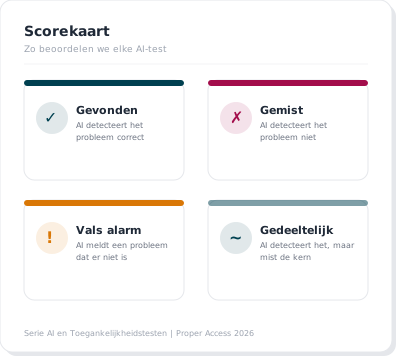
Each test gets a score:
| Score | Meaning |
|---|---|
| Found | AI correctly detects the problem |
| Missed | AI fails to detect the problem |
| False alarm | AI reports a problem that doesn’t exist |
| Partial | AI detects it but misses the core issue or gives incomplete advice |
At the end of the series, I’ll compile a complete overview: which WCAG criteria can AI reliably test, where does it help as a starting point, and where do you need a specialist? Given the speed of development right now, there’s a good chance we’ll have to start all over again by then. :)
Who is this series for?
- Developers who want to know which AI tools they can add to their workflow
- Product owners deciding between an automated scan and a manual audit
- E-commerce owners facing the EAA deadline and needing to act fast
- Digital agencies advising clients on accessibility who want to test automatically themselves
No AI hype. No doom scenarios. Just honest tests with real code.
This is part 0 of the series “AI and Accessibility Testing.” At Proper Access, we’re investigating what AI can actually detect, and where human expertise makes the difference. Curious how accessible your website or app is? Have it tested by a human for the best results. Get in touch.